- ChatGPT now works with iCloud Mail and iCloud Calendar on every plan, including Free.
- The connection uses an Apple app-specific password, never your regular password.
- It only reaches iCloud mail and events, not Gmail or Outlook accounts added to the Mail app.
- Start with read-only permissions and, when you disconnect, also do it at account.apple.com.
Summary
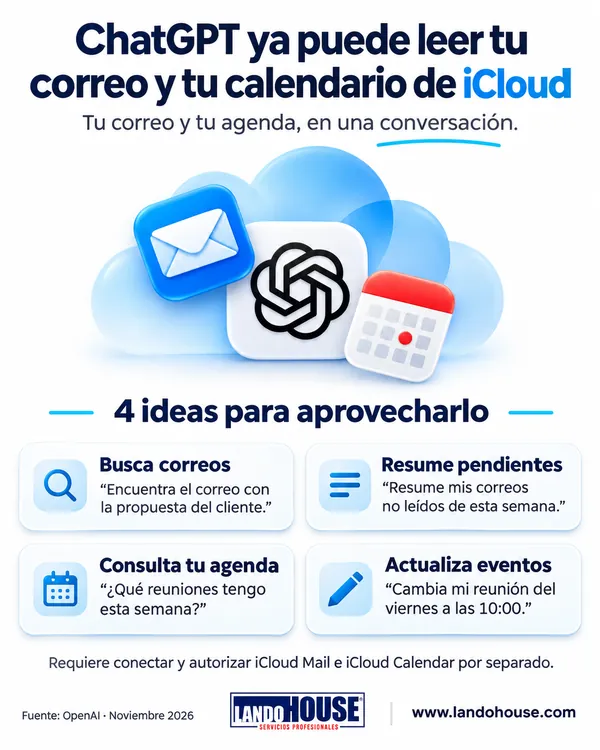
OpenAI has added two new plugins to ChatGPT, iCloud Mail and iCloud Calendar, so it can work with Apple's mail and calendar the same way it already did with Gmail and Google Calendar. You can ask it to search your inbox, summarize pending emails, tell you what's on this week or move an event.
Details
- Every plan: they are available on all ChatGPT plans, Free included, on the web, the desktop app and the iPhone app.
- What it can do: search emails, catch you up on your inbox, check upcoming events and change them. The Mail plugin can also draft and send emails.
- With a special password: you connect with an Apple app-specific password, not your regular one. Today's bonus shows how to create it.
- You decide how much it can do: choose whether ChatGPT always asks first, can only read, or can act on its own.
- iCloud only: it doesn't reach other accounts in the iPhone or Mac Mail app, such as Gmail or Outlook. Only iCloud mail and events (@icloud.com, @me.com or @mac.com).
- Its agent too: Dots, OpenAI's proactive agent, can use these plugins to work with your mail and calendar (on the Pro plan, according to GadgetsNow).
Why it matters
Hundreds of millions of people use Apple's mail and calendar and, until now, couldn't get much out of them with ChatGPT. With this move, OpenAI steps into iPhone users' daily routine just as Apple is betting on Google for its new Siri.
For anyone with a packed schedule the promise is simple: ask "what's on my plate today?" and get a summary of your emails and meetings. But, as always, think about how much access you grant: start with read-only permissions and widen them only if it pays off.
Would you let ChatGPT manage your email?
🔐 Bonus: connect iCloud to ChatGPT in 5 steps
ChatGPT doesn't use your regular Apple password to read your iCloud mail and calendar. It uses an app-specific password: a special key that only works for that connection and that you can revoke at any time. Here's how to set it up safely.
- Turn on two-factor authenticationApple only lets you create app-specific passwords if your account has it enabled. Check it in Settings › [your name] › Sign-In & Security.
- Create the passwords at AppleGo to account.apple.com, open Sign-In and Security › App-Specific Passwords and generate one. Better yet, create two — one for Mail and one for Calendar — so you can revoke them separately.
- Connect iCloud Mail in ChatGPTGo to Settings › Plugins, choose iCloud Mail, tap "Connect" and enter your iCloud address (@icloud.com, @me.com or @mac.com) and the password you just created.
- Repeat with iCloud CalendarBack in Plugins, choose iCloud Calendar and use your Apple Account's primary email (it may differ from your iCloud Mail address) with its own password.
- Choose the permission levelChatGPT lets you pick between always asking, read-only, allowing low-risk actions or allowing everything. Start with the most restrictive option that works for you.

Pro tip
Never paste your regular Apple password or the app-specific password into a chat. And if you ever want to disconnect, do it in both places: remove the plugin in ChatGPT and delete the password at account.apple.com. Disconnecting only in ChatGPT does not revoke the password at Apple. Also keep in mind that with "allow everything", ChatGPT could send an email without asking you first.
How much access should you give it?
- Always askAsks for confirmation before every action.
- Read-onlySearches and summarizes, changes nothing.
- Low-risk actionsAllows minor actions without asking.
- Allow everythingCould send emails without confirmation.
We also checked three details worth knowing (source: Notebookcheck, citing OpenAI's help pages):
- The app-specific password does not expire: it stays valid until you delete it, use "Revoke All" or change your main Apple Account password.
- Disconnecting the plugin does not delete your chats or saved memories; those are removed separately.
- On Free, Go, Plus and Pro, OpenAI may use information from connected apps to train its models if "Improve the model for everyone" is on. Business, Enterprise and Edu accounts are excluded by default.
Frequently asked questions
How much does it cost to connect iCloud to ChatGPT?
Nothing extra: the iCloud Mail and iCloud Calendar plugins are available on every ChatGPT plan, Free included, on the web, the desktop app and the iPhone app.
Do I have to give ChatGPT my Apple password?
No. You use an app-specific password created at account.apple.com that only works for that connection. Your account needs two-factor authentication to create one.
Can ChatGPT read my Gmail or Outlook from the iPhone Mail app?
No. The plugin only reaches iCloud mail and events (@icloud.com, @me.com or @mac.com), not other accounts set up in the Mail app.
Can ChatGPT send emails for me?
Yes. The Mail plugin can draft and send emails. If you choose "allow everything", it could send them without asking; that's why it's best to start with read-only.
How do I disconnect it completely?
In two places: remove the plugin in ChatGPT settings and delete the app-specific password at account.apple.com. Removing it only in ChatGPT does not revoke the password at Apple.
Does your company have rules for using AI with corporate data?
Connecting AI assistants to email and calendars is convenient, but it also opens the door to sensitive data. We help you define what's allowed, with which controls and who is accountable.
Sources and fact-checking
LandoHOUSE editorial newsletter based on GadgetsNow and Engadget, cross-checked with:
- MacRumors — ChatGPT Can Now Access Your iCloud Mail and Calendar (27/10/2026)
- Notebookcheck — ChatGPT can now read iCloud Mail, and disconnecting is not enough
- iGeeksBlog — ChatGPT adds iCloud Mail and Calendar plugins for all users
Brands mentioned belong to their owners; this newsletter implies no affiliation with OpenAI or Apple. Menu names may vary by app version.